
Features
Everything OpesFlux does, in one system
Point of sale, stock, purchasing, invoicing, accounts and payroll share one database and one login. Start on Starter and add purchasing, payroll and accounts as you grow. Also included: Shopify and WooCommerce sync, manufacturing (bills of materials, MRP, work orders), roles and permissions, and an audit log.
See it for your trade: wholesale, cash and carry, off-licences, multi-site shops.
Point of sale
A till that keeps selling when the internet doesn't.
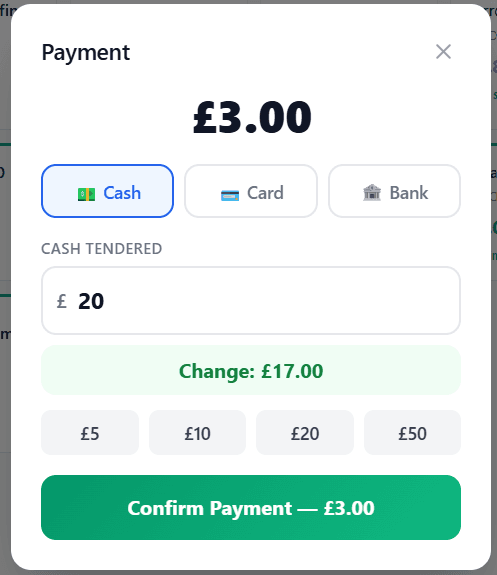
The OpesFlux point of sale runs in a web browser on a PC, laptop or tablet. Scan barcodes, apply discounts, take cash, card or bank transfer, and print a receipt. Every sale takes stock off and posts to the accounts straight away.
- Works offline: sales are stored and sync when the connection returns
- Barcode scanning, product search and a product grid
- Cash, card and bank transfer; attach a customer to a sale
- Per-product VAT rates, including zero-rated goods

Stock control
Stock you can trust, in every location.
Every sale, delivery, return, transfer and adjustment is recorded as a stock movement that can't be edited or deleted, and stock can never go below zero. Products can have variants, such as sizes or pack sizes, each with its own barcode.
- Stock per shop, branch or warehouse
- Transfers between locations
- Low-stock and reorder alerts
- Stock adjustments with a full movement history

Sales and customers
From quote to paid invoice without re-typing.
Turn a quote into a sales order and the order into an invoice. Delivery notes and shipping labels come from the same order. Customers have credit limits and payment terms, and OpesFlux emails overdue reminders every morning.
- Quotes, sales orders, invoices and recurring invoices
- Returns and credit notes
- Credit limits, payment terms and aged receivables
- Card payments through Stripe, and a customer portal for invoices and statements

Purchasing and suppliers
Buying with a paper trail.
Raise a purchase request, ask suppliers for quotes, turn the best one into a purchase order, send it for approval and record what actually arrived on a goods received note. Received goods go straight into stock.
- Purchase requests and requests for quotation
- Purchase orders with approval
- Goods received notes
- Supplier payments and aged payables
Accounts and VAT
The books keep up with the business.
Sales, purchases and payments post their own journal entries, so the double-entry accounts stay current. Reconcile the bank from open banking feeds, run your P&L and balance sheet, and get your VAT return figures. Submitting the VAT return is done by your accountant or MTD bridging software.
- Chart of accounts and journals
- Bank reconciliation with open banking feeds
- VAT return figures and VAT reports
- Fixed assets, multi-currency and multi-company reporting

Staff and payroll
Rotas, hours and pay in one place.
Build shifts and rotas, let staff clock in on the employee app (with a face check and optional geofence), handle leave requests, and run payroll from those hours. UK payroll calculates PAYE, National Insurance and auto-enrolment pensions; RTI submissions are sent by you or your payroll bureau.
- Shifts, rotas and attendance
- Leave requests and holiday accrual
- Payroll runs and payslips: UK, Japan, Pakistan and US rules
- Employee records, documents and recruitment
See it in action
Book a 20-minute demo and we'll walk through the features that matter to your business.
Free 7-day trial after demo · No credit card required