What is accounting software? Learn how it works, what features matter, and how UK businesses use it to automate bookkeeping, VAT, and payroll. Free demo.
What Is Accounting Software? Complete Guide for UK Businesses
What is accounting software? If you run a business in the UK, this question matters more than most. Accounting software is a digital system that records, organises, and reports on every financial transaction your business makes — automatically, accurately, and in real time.
Every invoice you raise. Every payment you receive. Every expense you incur. Every VAT transaction you process. Accounting software captures all of it, organises it into your chart of accounts, and turns it into reports your business can act on. No spreadsheets. No manual entry. No month-end panic.
For UK businesses specifically, accounting software does something even more important. It keeps you compliant. HMRC's Making Tax Digital mandate requires all VAT-registered businesses to keep digital records and submit VAT returns through approved software. Without proper accounting software, compliance becomes a legal risk — not just an administrative headache.
This guide explains everything. What accounting software is. How it works. What features matter. How UK businesses use it. And why the right system transforms your finances from a source of stress into a source of insight.
Learn more about accounting features.
Why Manual Bookkeeping Is Costing UK Businesses Money
Most UK small businesses still manage finances manually. Spreadsheets. Paper receipts. Separate invoicing tools. Manual bank reconciliation at month end. This approach is costing them far more than they realise.
The average UK small business spends 12 hours per week on manual financial admin. At £25 per hour management time, that is £15,600 per year spent on tasks that accounting software handles automatically.
Additionally, manual bookkeeping errors are expensive. 1 in 5 UK VAT returns contains errors — leading to penalties, interest charges, and HMRC investigations. Furthermore, businesses relying on spreadsheets often discover cash flow problems weeks after they develop — because their numbers are always out of date.
The three most expensive manual bookkeeping problems UK businesses face:
Problem 1 — Data entry errors. Every manual entry is a chance for a mistake. Transposed numbers, wrong VAT rates, missed invoices. Errors compound monthly until reconciliation becomes a full-day task.
Problem 2 — Late VAT returns. Without automated VAT tracking, calculating your return takes hours. Consequently, many businesses file late. HMRC's automatic late filing penalty starts at £200 for the first offence.
Problem 3 — No real-time visibility. Spreadsheets show you last month's numbers at best. Therefore, you make decisions based on outdated data. Accounting software shows you today's position — right now.
What Is Accounting Software? The Full Explanation
Accounting software is a system that automates financial record-keeping using the principles of double-entry bookkeeping. Every transaction creates two entries — a debit and a credit — that must always balance. This is the foundation of accurate financial reporting.
In practical terms, accounting software does the following:
- Records every sale, purchase, expense, and payment automatically
- Organises transactions into a structured chart of accounts
- Calculates VAT on every transaction at the correct rate
- Reconciles your bank account against your records
- Generates financial reports — P&L, balance sheet, cash flow — on demand
- Submits VAT returns digitally to HMRC under Making Tax Digital
- Produces invoices that meet HMRC's legal requirements
- Tracks what customers owe you and what you owe suppliers
The core principle: Every financial event in your business creates a record. Accounting software captures that record automatically, files it correctly, and makes it searchable, reportable, and compliant.
See how OpesFlux accounting works.
The 8 Core Features of Accounting Software
Not all accounting software is equal. Here are the eight features that matter most for UK businesses.
1. Chart of Accounts
The chart of accounts is the backbone of your accounting system. It is a structured list of every account your business uses to record transactions — assets, liabilities, equity, income, and expenses.
Good accounting software comes with a pre-built UK chart of accounts. Additionally, it lets you add custom accounts for your specific business needs. Every transaction posted goes to the correct account automatically.
2. Invoicing and Payments
Accounting software generates professional invoices that meet HMRC's legal requirements for VAT invoices. Every invoice includes your VAT registration number, the correct VAT rate per line, a VAT summary, and sequential invoice numbering.
Furthermore, payments recorded against invoices update your accounts automatically. Therefore, your accounts receivable balance is always accurate in real time.
See invoicing features.
3. Bank Reconciliation
Bank reconciliation matches your bank statement transactions against your accounting records. It confirms that every payment in and out of your bank account is correctly recorded.
Modern accounting software connects directly to your bank via Open Banking. Transactions import automatically every day. Consequently, reconciliation takes minutes instead of hours.
4. VAT Management and MTD Filing
For UK VAT-registered businesses, accounting software calculates VAT on every transaction automatically. It tracks output VAT (VAT you charge customers) and input VAT (VAT you pay suppliers) separately.
At the end of each VAT period, the software generates your nine-box VAT return. Additionally, it submits directly to HMRC under Making Tax Digital with one click. The HMRC acknowledgement stores automatically for your audit trail.
5. Financial Reporting
Accounting software generates three essential financial reports on demand:
- Profit and Loss Statement — revenue minus costs equals net profit or loss
- Balance Sheet — assets, liabilities, and equity at a specific date
- Cash Flow Report — money coming in and going out over a period
These reports are always live. Therefore, you never wait for month end to understand your financial position.
6. Expense Management
Every business expense — from office supplies to travel costs — needs to be recorded correctly. Accounting software categorises expenses automatically, tracks VAT on purchases, and feeds everything into your P&L report.
Additionally, expense approval workflows ensure purchases are authorised before they are recorded. Consequently, your expense records are always accurate and auditable.
7. Payroll Integration
The best accounting software connects directly to payroll. When you run payroll, the journal entries post automatically. PAYE, National Insurance, and pension contributions all flow into the correct accounts without manual entry.
See payroll features.
8. Audit Trail
Every change to every financial record is logged automatically. Who changed it. When they changed it. What it was before and after. This immutable audit trail is essential for HMRC investigations, year-end accounts, and Companies House filings.
How Accounting Software Works: Step by Step
Picture this scenario. You run a wholesale business with 15 staff and 200 customers.
Without accounting software:
Your sales team raises invoices in Word. Your bookkeeper copies them into a spreadsheet. Your bank statement arrives monthly and someone spends two days matching it manually. Your VAT return takes a full day to calculate. Your accountant charges £2,000 at year end to sort out your records.
Total monthly cost: 40+ hours of staff time. £2,400 annually in accountant fees for reconciliation work alone. Constant risk of errors.
With accounting software:
A customer places an order. The invoice generates automatically from the order. Payment arrives and records against the invoice automatically. Your bank imports daily via Open Banking. Reconciliation happens automatically. Your VAT return calculates itself at period end. Your accountant reviews clean records at year end and charges a fraction of the previous fee.
Total monthly cost: 2-3 hours of review time. Clean records. Zero reconciliation stress.
The difference is not small. It is the difference between finance being a burden and finance being a tool.
Real Examples: How UK Businesses Use Accounting Software
Independent retailer, 3 locations:
Before accounting software, the owner reconciled three tills manually every week. Each reconciliation took 3-4 hours. VAT returns took a full day every quarter. Additionally, she never knew her true profit margin until her accountant filed her annual accounts — months after the year ended.
Now her POS connects directly to her accounting. Every sale posts automatically. Bank reconciliation runs daily. Her VAT return generates in two minutes. Furthermore, she checks her live P&L every Monday morning over coffee. She made better stock decisions in the first month than she had in the previous year.
Restaurant group, 4 sites:
Managing VAT across four restaurants with different revenue levels was chaotic. Input VAT on food purchases, output VAT on food sales, zero-rated items, reduced-rated items — all calculated manually. Errors were constant.
With accounting software, VAT calculates automatically on every transaction at every site. The quarterly return consolidates all four locations into one submission. MTD filing takes one click. Consequently, their last four VAT returns were filed on time with zero errors.
Construction contractor, 12 employees:
CIS deductions from subcontractor payments were calculated on a spreadsheet. Monthly CIS returns were always submitted late. Additionally, reconciling materials costs against job budgets was impossible without a dedicated system.
With integrated accounting software, CIS deductions calculate automatically on every subcontractor payment. Monthly returns generate from the system. Job costs track against budgets in real time. Their accountant described their records as "the cleanest we've seen from a contractor this size."
Learn more about industry solutions.
Cloud Accounting Software vs. Desktop Software
The way accounting software is delivered has changed completely. Here is what you need to know.
Desktop Accounting Software
Traditional accounting software installed on one computer. Your data lives on that computer. Only one person can access it at a time. Updates require manual installation. If the computer fails, your data may be lost.
Examples: Sage 50 Desktop, QuickBooks Desktop
Cloud Accounting Software
Modern accounting software accessed through a browser. Your data lives securely in the cloud. Any team member can access it from anywhere. Updates happen automatically. Your data is backed up continuously.
Examples: Xero, QuickBooks Online, OpesFlux
| Factor | Desktop | Cloud |
|---|
| Access | One computer only | Any device, anywhere |
| Updates | Manual, paid | Automatic, included |
| Backup | Manual | Automatic |
| Multi-user | Limited | Unlimited |
| Integration | Difficult | Built-in APIs |
| Cost | High upfront | Monthly subscription |
| MTD Compliance | Requires add-ons | Built-in |
| Bank Feed | Manual import | Automatic daily |
For UK businesses in 2026, cloud accounting software is the clear choice. HMRC's Making Tax Digital requires digital record-keeping and digital submission. Cloud software handles both automatically.
Accounting Software vs. ERP: What Is the Difference?
Many UK businesses outgrow standalone accounting software. Here is where ERP comes in.
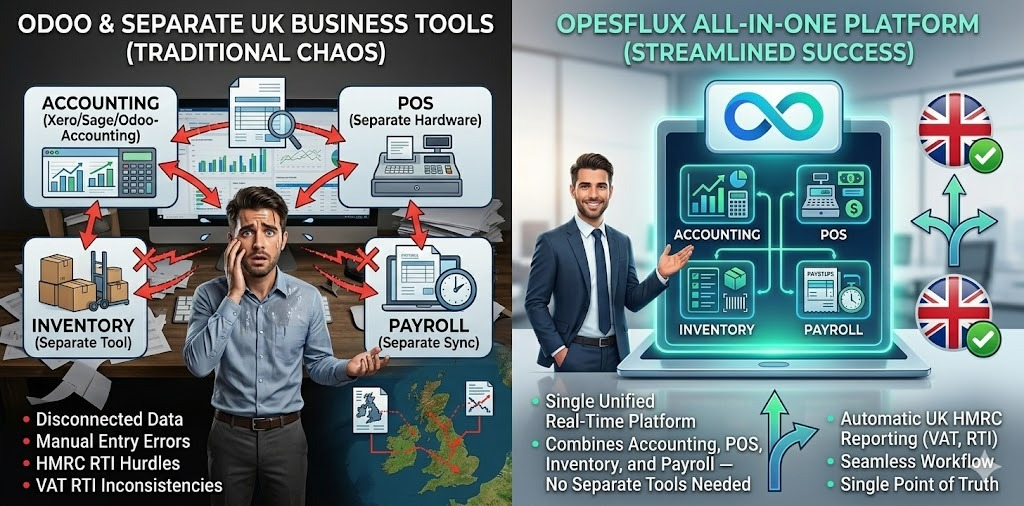
Accounting software handles your finances. It records transactions, generates reports, and manages VAT. However, it does not manage your stock. It does not run your till. It does not process your payroll natively. It does not manage your suppliers or your purchase orders.
ERP software does all of this in one system. Point of sale, inventory, purchasing, accounting, payroll, HR, and compliance — all connected, all sharing the same data.
| Feature | Accounting Software | ERP (OpesFlux) |
|---|
| Invoicing | ✅ | ✅ |
| VAT & MTD | ✅ | ✅ |
| Bank Reconciliation | ✅ | ✅ |
| Financial Reports | ✅ | ✅ |
| Point of Sale | ❌ | ✅ |
| Inventory Management | ❌ | ✅ |
| Purchase Orders | ❌ | ✅ |
| Payroll & RTI | Limited | ✅ |
| Multi-Location | ❌ | ✅ |
| CRM | ❌ | ✅ |
| CIS Module | ❌ | ✅ |
| Offline Mode | ❌ | ✅ |
The question is not whether you need accounting software. You do. The question is whether standalone accounting software is enough — or whether your business needs everything connected in one place.
See how OpesFlux compares.
OpesFlux vs. Competitors: Accounting Software Comparison
Here is how OpesFlux compares to the most popular accounting software UK businesses use.
OpesFlux vs. Xero
Xero is a strong cloud accounting tool. However, it does not include POS, inventory management, or purchase orders natively. Additionally, payroll requires a separate Xero Payroll subscription. Furthermore, Xero has no offline mode — your till stops if the internet goes down.
OpesFlux includes all of this in one platform. Accounting, POS, inventory, payroll, and compliance — connected from day one.
OpesFlux vs. QuickBooks
QuickBooks Online is widely used for basic bookkeeping. However, it is US-first software adapted for the UK market. MTD VAT compliance requires specific configuration. Additionally, inventory management is basic and multi-location stock is not supported.
OpesFlux is built UK-first with MTD VAT, PAYE RTI, CIS, and auto-enrolment built into the core product — not added on top.
OpesFlux vs. Sage
Sage 50 is a powerful desktop accounting system. However, it requires local installation, manual updates, and significant setup time. Additionally, cloud access requires an extra subscription. Furthermore, Sage does not include POS or multi-location inventory.
OpesFlux is cloud-native, goes live in 24 hours, and includes every feature Sage provides plus POS, inventory, and multi-location support.
OpesFlux vs. Odoo
Odoo is the closest competitor in scope — it covers accounting, inventory, and POS like OpesFlux. However, Odoo requires technical expertise to implement. Most businesses need an expensive Odoo partner to configure it. Setup typically takes weeks or months.
OpesFlux goes live in 24 hours. No technical expertise required. No partner fees. No implementation project.
Book a free demo and see the difference in 20 minutes.
UK Compliance: What Your Accounting Software Must Handle
UK accounting software must do more than record transactions. Here is what HMRC requires.
Making Tax Digital (MTD) for VAT
Since April 2022, all VAT-registered businesses with taxable turnover above £85,000 must keep digital VAT records and submit returns through HMRC-approved software. From April 2026, this threshold drops to £30,000.
Your accounting software must be HMRC-approved for MTD. It must maintain a digital audit trail from source transaction to VAT return submission. Additionally, it must submit directly to HMRC — not via manual data entry on the HMRC portal.
PAYE and RTI
If you employ staff, your accounting software or integrated payroll must submit a Full Payment Submission to HMRC before every pay day. Late RTI submissions trigger automatic penalties.
Companies House Reporting
UK limited companies must file annual accounts formatted to UK GAAP standards. Your accounting software must produce a Profit and Loss statement and Balance Sheet in the correct format for Companies House submission.
GDPR and Data Protection
Your accounting software stores personal data about customers and employees. Under UK GDPR, you must be able to export all personal data on request and permanently erase it when required — while retaining financial transaction records for six years as HMRC requires.
See UK compliance features.
How to Choose the Right Accounting Software for Your Business
Choosing accounting software is one of the most important technology decisions your business makes. Here is exactly what to evaluate.
Step 1: Assess Your Needs
Start with your business size and complexity. A sole trader needs invoicing, expense tracking, and VAT. A retail shop with staff needs all of that plus POS, inventory, and payroll. A wholesale distributor needs purchase orders, supplier management, and multi-location stock on top.
Step 2: Check MTD Compliance
Your accounting software must be on HMRC's list of MTD-compatible software. Without this, you cannot legally file your VAT return. Check: https://www.gov.uk/guidance/find-software-thats-compatible-with-making-tax-digital-for-vat
Step 3: Evaluate Integration
Does it connect to your bank automatically via Open Banking? Does it integrate with your till? Does payroll post to your accounts automatically? Every integration you do not have is a manual process you add back.
Step 4: Consider Setup Time
The best accounting software goes live quickly. If setup takes months, you are paying for software before it delivers value. Additionally, long setup projects often fail before they complete.
Step 5: Check Support
UK businesses need UK support. Time zones, compliance knowledge, and understanding of HMRC requirements matter. Ensure your software provider has UK-based support available during business hours.
Frequently Asked Questions About Accounting Software
What is accounting software used for?
Accounting software is used to record financial transactions, generate invoices, calculate VAT, reconcile bank accounts, produce financial reports, and submit tax returns to HMRC. It replaces manual bookkeeping with automated, accurate financial management.
Do small businesses need accounting software?
Yes. Even sole traders benefit from accounting software. HMRC's Making Tax Digital requires digital VAT records for all VAT-registered businesses. Additionally, accurate financial records are essential for tax returns, loan applications, and business decisions.
What is the best accounting software for UK small businesses?
The best accounting software depends on your needs. For businesses needing only bookkeeping, Xero or QuickBooks work well. For businesses needing accounting connected to POS, inventory, and payroll in one system, OpesFlux is the complete solution.
Is cloud accounting software safe?
Yes. Cloud accounting software uses bank-level encryption to protect your data. Additionally, automatic daily backups mean your data is never lost. Furthermore, cloud software is more secure than data stored on a single office computer.
How much does accounting software cost?
Basic accounting software costs £12-30 per month. Full-featured cloud accounting costs £30-80 per month. An all-in-one ERP with accounting, POS, inventory, and payroll costs £100-300 per month. This is significantly less than the cost of separate tools, manual labour, and accountant fees for reconciliation.
What is double-entry bookkeeping?
Double-entry bookkeeping is the accounting principle behind all professional accounting software. Every transaction creates two entries — a debit in one account and a credit in another. The total of all debits must always equal the total of all credits. This ensures your accounts are always balanced and accurate.
What is the difference between accounting software and bookkeeping software?
The terms are often used interchangeably. Bookkeeping software typically refers to basic transaction recording. Accounting software includes bookkeeping plus financial reporting, VAT management, and compliance features. For UK businesses, you need full accounting software — not just bookkeeping tools.
Getting Started With Accounting Software
The right time to implement proper accounting software is now. Not at year end. Not when HMRC sends a compliance notice. Now.
Every week without proper accounting software costs you time, money, and accuracy. Staff spend hours on tasks that should take minutes. VAT calculations contain errors that trigger penalties. Financial reports arrive weeks late — too late to act on.
The good news is that modern accounting software sets up fast. Most businesses are fully operational within 24 hours. Your chart of accounts configures automatically. Your bank connects on day one. Your VAT settings match your HMRC registration from the start.
Your business deserves financial records that are always accurate. It deserves VAT returns that file themselves. It deserves a P&L that updates the moment a sale happens. It deserves accounting software that works as hard as you do.
The question isn't "Should I get accounting software?" It's "How much has not having it already cost me?"
Book Your Free Demo — See how OpesFlux accounting works in 20 minutes.
Explore Accounting Features — See every feature built in.
View Pricing — Transparent plans for every business size.
Find Your Industry Solution — Accounting built for your sector.
Related Resources
What Is an ERP System? Complete Guide for UK Businesses
What Is Payroll? Complete Guide for UK Small Businesses
What Is Inventory Management? Complete Guide for UK Businesses
How to Choose an ERP System for Your Growing Business
Managing Payroll Across Multiple Countries: A Complete Guide
About OpesFlux
OpesFlux is the all-in-one ERP and POS platform built for businesses worldwide. Accounting, invoicing, VAT, bank reconciliation, payroll, inventory, and point of sale — all in one place.
Full double-entry accounting with MTD VAT filing direct to HMRC. Bank reconciliation via Open Banking. P&L, balance sheet, and cash flow reports updated live. Every compliance deadline handled automatically.
No setup fees. No infrastructure costs. Most businesses are live within 24 hours.
Visit OpesFlux — opesflux.devsandvisuals.com
Book a Free Demo — opesflux.devsandvisuals.com/contact
Contact Us — hello@opesflux.devsandvisuals.com | +44 7490 350688 | Devs and Visuals Ltd, Kington, England