What is an ERP system? Learn how ERP software works, why Global businesses need it, and how to choose the right solution. Free demo available
/
What Is an ERP System? The Simple Answer
What is an ERP system exactly? Many business owners ask this question. The answer is straightforward: an ERP system brings all your business operations together in one place.
An ERP system (Enterprise Resource Planning) is software that connects everything. Instead of managing sales, accounting, inventory, and payroll separately, an ERP system unites them. Think of it as the brain of your business.
Here’s why this matters. Right now, your data lives everywhere. Sales are in one tool. Accounting is in another. Inventory is in a spreadsheet. Payroll is somewhere else. Nothing talks to anything. Therefore, you spend hours entering data multiple times. Consequently, mistakes happen constantly.
An ERP system fixes this completely. When a customer buys something, the sale enters one place. Immediately, stock updates. The invoice generates. Accounting records the income. Everything happens automatically.
For Global businesses, this integration becomes critical. You must handle VAT compliance. Additionally, you need PAYE submissions. Furthermore, auto-enrolment pensions require tracking. Besides that, Companies House filings demand accuracy. An ERP system manages all of this.
Learn more about ERP features.
Why Most Businesses Struggle Without an ERP System
Without an ERP system, your business faces constant challenges. First, data entry takes hours daily. Second, numbers never match between systems. Third, compliance deadlines stress you out. Fourth, you can’t see real business performance.
Consider this: how much time do your staff spend on spreadsheets? How often do you discover errors in your data? When was the last time you filed VAT correctly on time?
Research shows 67% of Global small businesses use 3+ separate tools. Therefore, they waste 12 hours weekly on manual reconciliation. Additionally, stock errors cost them £2,400 annually. Moreover, many miss VAT filing deadlines.
An ERP system eliminates these problems. Your staff focuses on growing the business. Data accuracy improves dramatically. Compliance becomes automatic. Your business runs smoothly.
The Five Core Components of an ERP System
An ERP system manages five key business areas. Understanding these helps you see why an ERP system matters.
An ERP system tracks every customer interaction. From quote to delivery to payment, everything is recorded.
Your team can: - Create professional quotes quickly - Manage orders through their entire lifecycle - Process returns easily - Record payments accurately - Track outstanding balances automatically
Every customer gets one record. Therefore, your whole team knows their complete history.
An ERP system shows stock levels instantly. Whether you have one location or ten, you see everything.
Key features include: - Real-time stock visibility everywhere - Automatic low stock alerts - Stock transfer between locations - Batch and serial number tracking - Complete movement history
No guessing inventory. You always know exactly what you have.
An ERP system manages supplier relationships. From ordering to payment, it’s all tracked.
Typical functions include: - Quick purchase order creation - Automatic supplier communication - Delivery tracking - Goods receipt recording - Payment management
You always control your supplier relationships. Additionally, you track spending easily.
An ERP system handles money properly. It uses double-entry bookkeeping standards throughout.
Features include: - Invoice generation from orders - Payment tracking - Bank reconciliation - Journal entry posting - Financial report generation
Your accounting becomes clean and auditable. Furthermore, tax compliance improves dramatically.
An ERP system manages your team. From hiring through paying, it’s all included.
Functions include: - Employee record management - Hour tracking for pay calculation - Automatic wage calculation - Professional payslip generation - HMRC tax filing
Payroll goes from complicated to simple. Moreover, compliance becomes automatic.
How Does an ERP System Actually Work?
Picture this scenario. You run a shop with two branches. A customer buys a shirt for £20.
Without an ERP system: - Ring it up on the till (5 minutes) - Write it in the sales book (2 minutes) - Check inventory on paper (3 minutes) - Update the spreadsheet (4 minutes) - Enter it in accounting software (3 minutes) - Record the payment separately (2 minutes)
Total: 19 minutes of manual work per transaction.
With an ERP system: - Scan the barcode (10 seconds) - Everything updates automatically
Stock decreases across both locations. Sales record instantly. Accounting captures the income. Customer record updates. Reports refresh.
Total: 10 seconds.
This difference multiplies across your business. Therefore, your team becomes dramatically more productive.
Real Examples: How Different Businesses Use ERP Systems
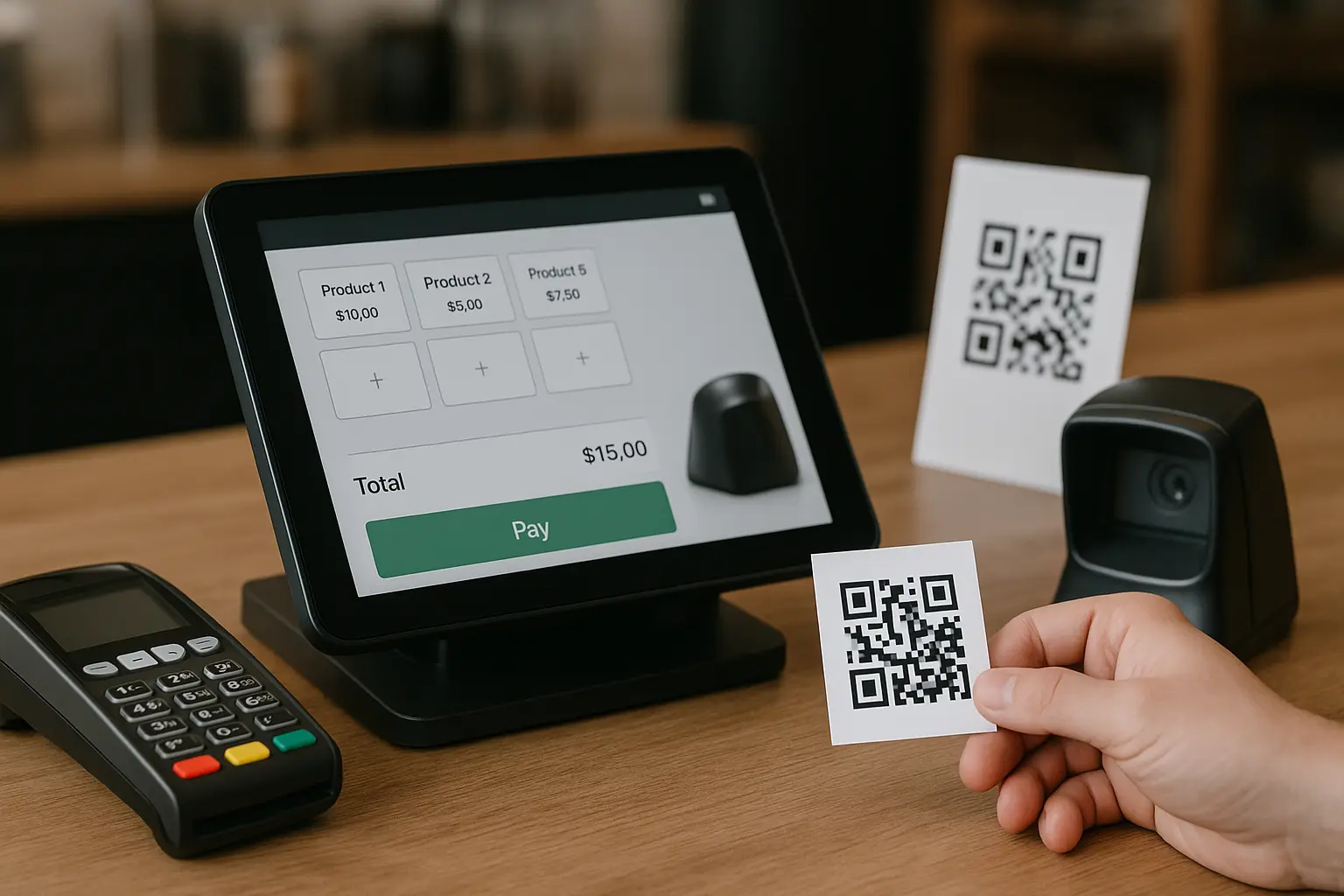
Small corner shop: Uses the POS screen daily. At day’s end, they see total revenue, items sold, remaining inventory, and VAT collected. No manual counting needed.
Restaurant group: Operates four locations. They track food waste per restaurant, calculate payroll for staff, file MTD VAT returns, and see which restaurant is most profitable. One dedicated accountant used to do reconciliation. Now the ERP system does it automatically.
Wholesale distributor: Manages 200+ suppliers, maintains stock across 3 warehouses, invoices 500+ customers, and files taxes accurately. They eliminated a full-time reconciliation role because the ERP system automates everything.
Learn more about industry solutions.
ERP vs. Other Business Software: What’s Different?
People often confuse ERP with other software. Here’s the difference.
ERP vs. Accounting Software
Accounting software handles invoices and taxes. However, it doesn’t track inventory, manage orders, or handle payroll integration.
An ERP system does all of that. Additionally, it integrates everything together.
Use accounting software if: You’re a service business with no products.
Use an ERP system if: You sell physical products or manage multiple operations.
ERP vs. POS
POS systems ring up sales. Furthermore, they take payments. However, they don’t connect to accounting, inventory, or payroll.
An ERP system includes your POS. Additionally, it integrates with every other part of your business.
Use POS if: You just need a till.
Use an ERP system if: You need the till to talk to accounting and inventory.
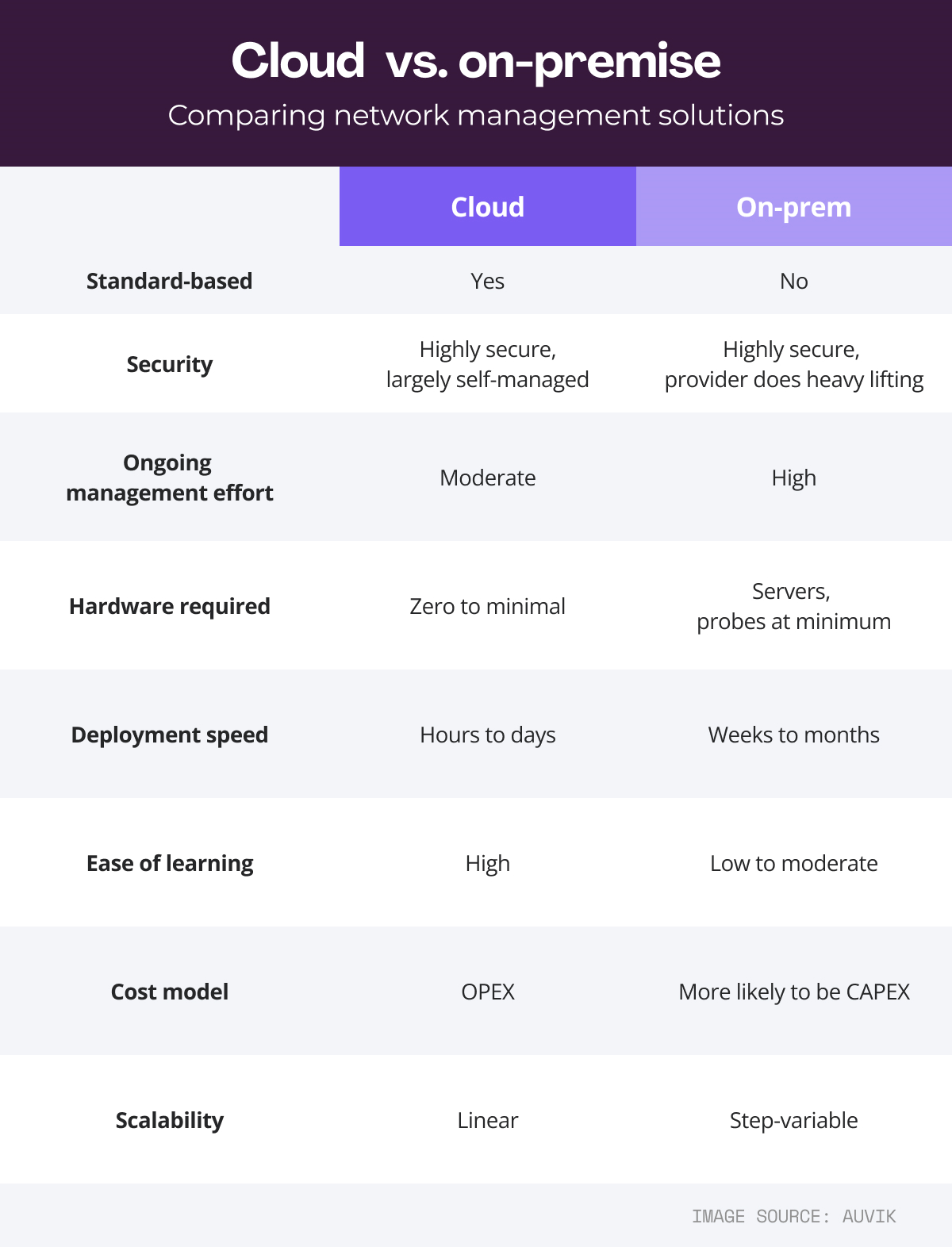
Cloud ERP vs. On-Premise: Which Works Better?
Two main deployment options exist.
Cloud-Based ERP
Software runs on vendor servers. You access it via web browser. Data stays in secure data centers.
Advantages: - Lower monthly cost (£100-500) - Works from anywhere - Automatic updates - No IT staff needed - Scales easily
Disadvantages: - Monthly subscription cost - Internet required - Data stored externally
On-Premise ERP
Software runs on your servers. You control everything locally.
Advantages: - One-time purchase - Complete control - Works offline
Disadvantages: - Very high upfront cost (£50,000+) - Requires IT team - Hard to scale - Slow to update
Recommendation: Cloud ERP wins for most Global businesses. Lower cost, faster setup, better security.
Key Benefits of Implementing an ERP System
An ERP system delivers real business improvements.
Benefit 1: No More Manual Data Entry
Currently, you enter data multiple times. Each entry creates opportunities for errors.
With an ERP system, one entry updates everything. Therefore, your team saves hours daily. Consequently, mistakes disappear.
Benefit 2: Real-Time Business Visibility
You always see current information. Revenue figures update instantly. Stock levels refresh automatically. Outstanding payments appear immediately.
This lets you make better decisions faster.
Benefit 3: Effortless Global Compliance
Global requirements are complex: - VAT filing to HMRC - PAYE submissions - Auto-enrolment pensions - GDPR data handling - Companies House filings
An ERP system handles all of this automatically. Therefore, compliance becomes simple. Moreover, deadlines never get missed.
Benefit 4: Growth Without Extra Staff
As you expand, you don’t hire more admin people. An ERP system scales with your business.
Adding locations? The system handles it. Hiring employees? Payroll scales automatically.
Benefit 5: Data-Driven Decisions
With current information, you make better choices. You notice unprofitable products immediately. Therefore, you reduce orders quickly. Consequently, you save thousands in waste.
How to Choose the Right ERP System
Not all ERP systems are equal. Here’s what matters.
Requirement 1: Built for Your Industry
Does the ERP have features for your business?
• Retail: POS, multi-location stock, returns, loyalty
• Restaurants: Kitchen display, table management, waste tracking
• Construction: CIS compliance, job costing, subcontractor tracking
• Manufacturing: Bill of materials, production planning
Check carefully. Features should be built-in, not expensive add-ons.
Requirement 2: Global Compliance Native
This is absolutely critical. Your ERP must support:
• VAT calculations and MTD filing
• PAYE and RTI submissions
• Auto-enrolment pension tracking
• GDPR compliance tools
• Companies House reporting
Many ERP systems are US-built. Therefore, Global compliance feels bolted on. Avoid these systems. Look for solutions built specifically for Global businesses.
Requirement 3: Start Small, Grow Later
Can you add features gradually? The best systems let you:
• Begin with POS and invoicing
• Add inventory later
• Add payroll when you hire
• Add accounting as needed
• Add compliance features when ready
This saves money initially.
Requirement 4: Easy to Use
Your staff will use this daily. Therefore, it must be intuitive.
Look for: - Modern, clean interface - Mobile-friendly design - Minimal training required - Responsive customer support
Test it with your team. Ask: “Would you enjoy using this?”
Requirement 5: Transparent Pricing
Watch for hidden costs carefully:
• Per-user charges (expensive with growth)
• Setup fees (£5,000-20,000)
• Mandatory support contracts
• Customization expenses
Look instead for: - Feature-based pricing - Included implementation - Flexible support options - No surprise costs
Frequently Asked Questions About ERP Systems
What is an ERP system used for?
An ERP system manages all business operations. Sales, inventory, accounting, payroll, compliance—everything together. Therefore, it eliminates fragmented systems. Learn about ERP capabilities.
How much does an ERP system cost?
Cloud ERP systems cost £100-500 monthly. Additionally, optional setup costs £0-2,000. Traditional ERP systems cost £50,000-500,000. Cloud options offer better value for most businesses.
How long does implementation take?
Cloud ERP: 1-4 weeks typically On-premise ERP: 6-24 months usually
Cloud systems go live much faster.
Can ERP work offline?
Some cloud systems support offline mode. Your staff works offline. Therefore, data syncs when internet returns. Check this feature if you need it.
What’s the difference between ERP and accounting software?
Accounting software handles invoices and taxes. ERP systems do that plus inventory, POS, purchasing, and payroll. Use ERP if you have inventory. Use accounting software for service-only businesses.
Is ERP secure?
Cloud ERP uses bank-level security. Enterprise encryption protects data. Regular backups prevent loss. Professional monitoring ensures safety. Therefore, cloud ERP is usually more secure than on-premise systems.
Why Global Businesses Are Switching to ERP Now
The trend is clear. More Global businesses abandon spreadsheets daily.
Reasons include:
1. Compliance costs keep rising. MTD VAT deadlines, RTI submissions, GDPR requirements—all need integrated data. Manual systems fail.
2. Manual work drains money. Staff spend 12+ hours weekly on reconciliation. That’s thousands in salary spent on tedious tasks. An ERP system costs less.
3. Errors are expensive. One stock error means £2,400 annual loss. One accounting mistake triggers audits. ERP systems eliminate human error.
4. Scaling multiplies problems. Adding locations or staff exponentially complicates manual systems. ERP systems scale automatically.
5. Cloud is finally reliable. Ten years ago, cloud ERP was risky. Today it’s the standard. Secure, fast, always available.
ERP Solutions for Different Business Sizes
Different sizes need different approaches.
1-3 Staff (Corner Shop)
You need: - POS for sales - Basic invoicing - VAT filing help - Simple reports
You probably don’t need yet: - Multi-location inventory - Payroll (if sole trader) - Full accounting
4-20 Staff (Small Business)
You need: - Multi-location inventory - Purchase orders - Payroll processing - Customer ledger - Basic accounting
20-100 Staff (Medium Business)
You need: - Everything from small business - Full accounting - Bank reconciliation - Advanced inventory - Leave management
100+ Staff (Enterprise)
You need: - All features enabled - Multi-company support - Consolidated reporting - Complex payroll - System integrations
Getting Started With an ERP System
Taking action is simple. First, understand your needs. Second, compare options. Third, start with a trial.
Your business deserves better than spreadsheets. An ERP system transforms operations. It saves time, eliminates errors, ensures compliance, enables growth.
The question isn’t “Should I get an ERP system?” It’s “Why am I still using spreadsheets?”
Book Your Free Demo – See how OpesFlux works in 20 minutes.
Download the ERP Comparison Guide – Understand your options.
Explore OpesFlux Features – See what’s possible.
Find Your Industry Solution – Get tailored features.
Related Resources
ERP System Examples: How Businesses Use Them
Cloud vs On-Premise ERP: Complete Comparison
Best ERP Systems for Global Businesses
How to Implement ERP Successfully
Multi-Location Inventory Management Guide
Global Tax Compliance Made Simple
About OpesFlux
OpesFlux is the ERP system built for Global businesses. From corner shops to enterprises, OpesFlux integrates sales, inventory, accounting, payroll, and compliance.
No setup fees. No infrastructure costs. Implementation in weeks, not months.
Visit OpesFlux – www.opesflux.devsandvisuals.com
Start Free Trial – app.opesflux.devsandvisuals.com
Contact Us – hello@opesflux.devsandvisuals.com
Phone: +44 7490 350688